
What an AI Image Costs in 2026: The Real Cost Per Image

Ask ten people what an AI image costs and you'll get ten answers, because the industry can't agree on a unit. Runway's 2026 pricing guide puts the range at $0 to about $0.25 per image through an API, or roughly $8 to $210 a month for subscription plans billed annually. OpenRouter's testing found one model billing $0.006 for a short prompt and $0.211 for the same image at a higher quality setting. That 35x spread is the whole cost per image story in one line.
The honest answer to "what does an AI image cost" is: it depends on the model, the resolution, the quality setting, and how many attempts you burn getting it right. Here's what the cost per image actually looks like in 2026. A single cost per image figure almost always hides more than it reveals.
The Real Cost Per Image, by Tier
Runway's guide breaks API pricing into three bands, and the spread is wide. The gap between the cheapest and priciest cost per image is more than tenfold:
- Budget API — $0.014 to $0.04: FLUX.2 [klein] starts around $0.014, FLUX.2 [pro] around $0.03, and Nano Banana 2 Lite sits at about $0.034 at 1K.
- Standard API — $0.05 to $0.13: GPT Image 2 at medium quality lands near $0.05, Nano Banana 2 runs about $0.067 at 1K and $0.101 at 2K, and FLUX.2 [max] starts near $0.07.
- Premium / high-resolution — $0.13 to $0.24: the top band, where resolution and refinement push the cost per image up sharply.
For context, traditional studio product photography has run roughly $45 to $90 per finished image. Even the most expensive AI tier is a rounding error next to that — which is why the cost per image conversation has moved from "is it cheaper?" to "how much cheaper, and at what quality?"
Why You Can't Compare Prices Directly
Here's the part most pricing pages bury. Models aren't sold in the same unit:
- Per image — Grok, Recraft, Riverflow, Qwen, and Seedream.
- Per megapixel — FLUX.2.
- Per token — Gemini, OpenAI, and Microsoft MAI.
OpenRouter's team put it plainly: you cannot compare two models by reading their prices side by side. A $0.06-per-megapixel listing and a $0.13-per-image listing may bill the same in practice, or may not, depending on what you generate.
So when you see a cost per image figure quoted confidently, check the unit behind it. A meaningful cost per image comparison requires normalizing for resolution and quality first. Without that, any cost per image claim is marketing rather than math.
The Real Cost Per Image Is the Retry
The biggest line item in AI image spending isn't the sticker price — it's iteration. OpenRouter measured the same image moving from $0.006 to $0.211 purely because of a quality setting.
That means your effective cost per image is really the cost of a usable image, including the attempts that miss. Five failed generations at $0.05 each turns a five-cent image into a thirty-cent one. This is where cheap models win: at $0.014 per attempt, exploring ten compositions is trivial, while at $0.24 it isn't.
Cheap generation doesn't just save money — it changes how you work, because you can afford to test instead of guessing. The lower the cost per image, the more experiments you can justify.
Are Free Tiers Enough?
Partly. Runway offers 125 one-time sign-up credits, Adobe Firefly and Canva both have free plans with limits, and commercial use is allowed on Runway's free tier.
Free allowances are excellent for evaluating a cost per image trade-off without a card on file. They stop being sufficient the moment you need volume, consistency, or higher resolution — which is the point at which the cost per image calculation starts to matter.
API or Subscription?
Neither is universally cheaper. Runway's guide makes the distinction clearly:
- Subscriptions suit heavy solo users — a fixed allowance plus an unlimited low-priority mode often beats paying cost per image for every draft.
- Pay-as-you-go APIs suit developers and pipelines, where the cost per image scales directly with volume and nothing goes unused.
The deciding question is utilization. If you're generating daily, a subscription usually wins on effective cost per image. If you generate in bursts, metered pricing does. Either way, the cost per image is the number to watch — not the monthly sticker.
Hidden Costs the Sticker Price Leaves Out
The quoted cost per image rarely includes everything:
- Failed generations — they bill whether or not you keep the result.
- Upscaling — a 1K image that needs 4K may take a second pass.
- Editing round-trips — fixing a detail costs another generation.
- Subscription sprawl — juggling several tools to access several models adds up.
- Your time — the most expensive input of all.
A realistic cost per image budget accounts for all five, not just the API rate. Most teams that feel over budget have a retry problem, not a pricing problem — their cost per image is fine on paper and brutal in practice.
How to Actually Budget for AI Images
Three habits keep your effective cost per image sane:
- Start cheap, finish expensive — draft at the $0.014 tier, render finals at the premium tier.
- Normalize before comparing — put every model on the same resolution and quality before you trust a cost per image number.
- Track your retry rate — if you're regenerating six times, the model is costing you six times the sticker, and your real cost per image is nowhere near the published rate.
A Prompt to Try Today
Understanding your cost per image starts with knowing what a good prompt produces on the first try. A prompt that lands first time is the cheapest possible cost per image. Try this on Fanch AI:
Copy & Paste this into Fanch AI (Model: gpt_image_2):
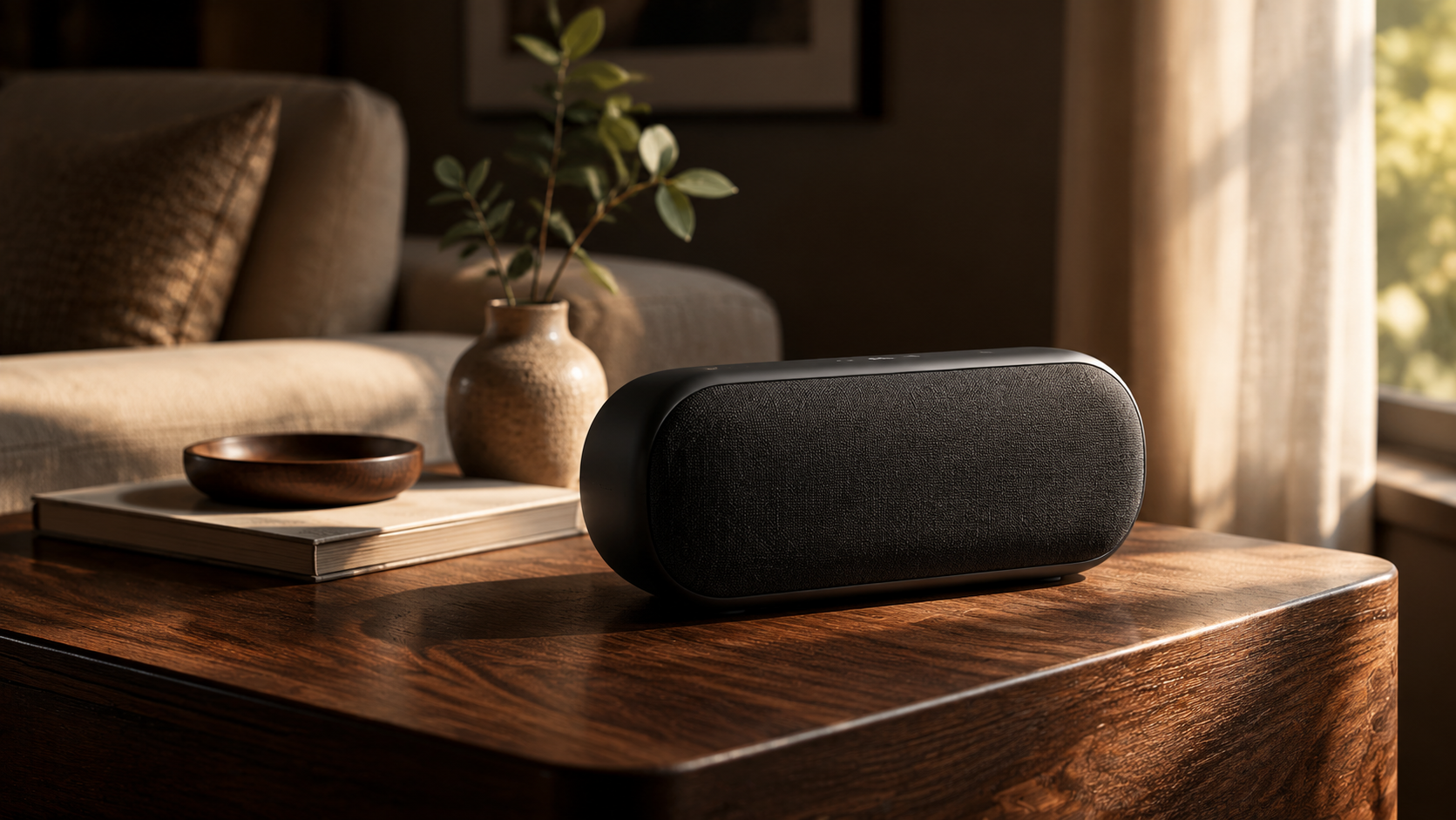
Create a premium advertising photograph of a matte black wireless speaker on a dark walnut side table, lit by a single soft window light from the right. Deep shadows on the left, a subtle highlight tracing the speaker grille, a blurred warm interior background, and crisp texture detail on the wood grain. Editorial product photography, shallow depth of field, 16:9 framing, 8K detail, no text.
Why Fanch AI Changes the Cost Per Image Math
Fanch AI puts multiple image models behind one interface, so you don't have to manage five subscriptions or compare per-token and per-megapixel rates to find a reasonable cost per image. You prompt, you iterate, you get a finished file — and your effective cost per image stays predictable.
👉 Start here: GPT Image 2 on Fanch AI — generate great images without the pricing puzzle.