
How to Create Hyper-Realistic AI Travel Photos with ChatGPT Image 2 + Seedance 2.0
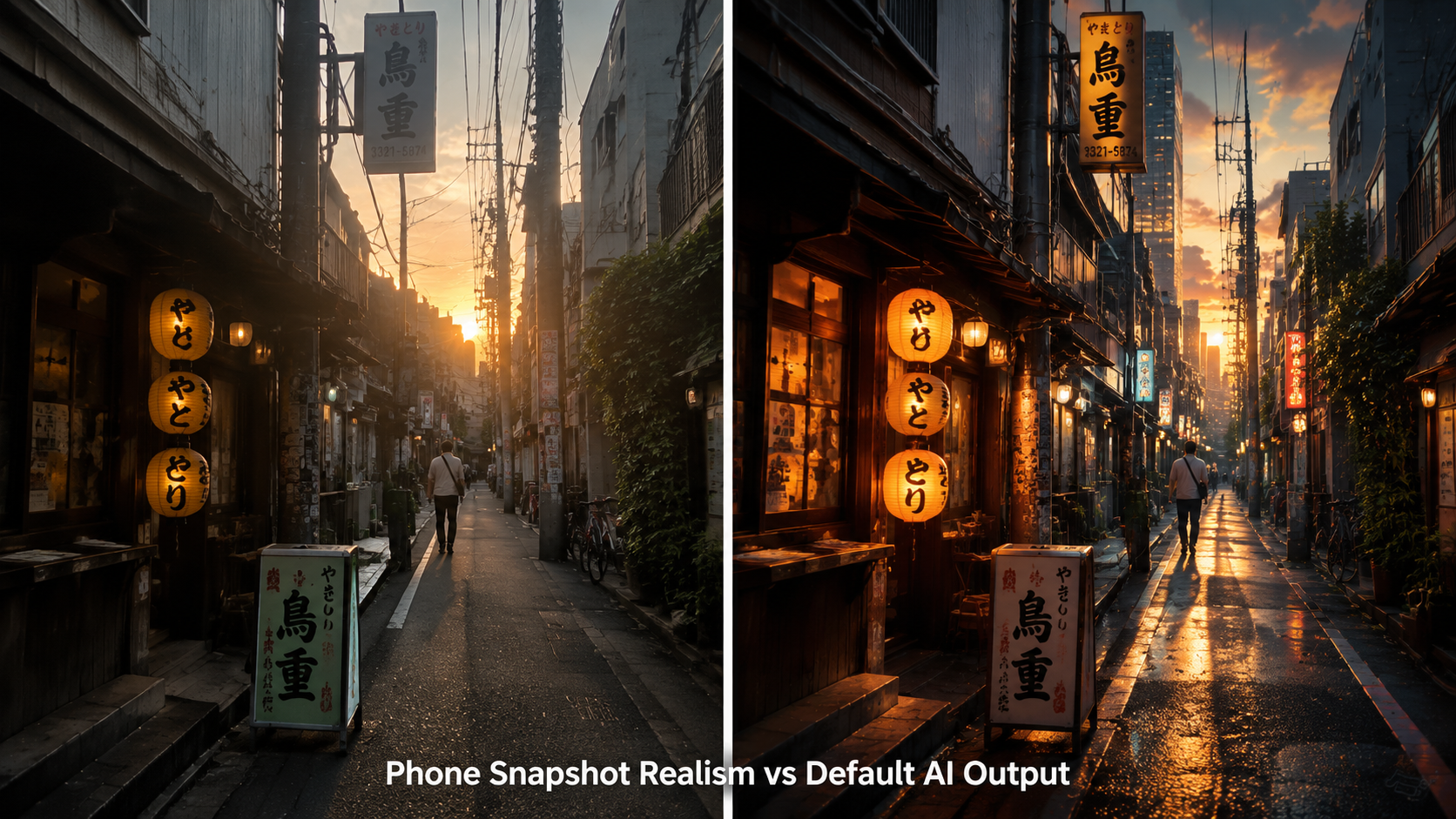
A Reddit post on r/ChatGPT just hit 527 upvotes by sharing a technique for generating realistic AI photos that most people can't distinguish from real phone camera shots. The trick? Telling the AI image generator to make the photo look worse — deliberately adding sensor noise, compression artifacts, and smartphone imperfections.
The creator used ChatGPT Image 2.0 to generate realistic AI photos, then brought those realistic AI photos into Seedance 2.0 for video. The result: AI photos and videos that look like genuine vacation footage — shaky handheld motion, imperfect framing, autofocus hunting. These aren't polished AI images. They're realistic AI photos that could pass for something on your camera roll.
Here's how to create your own realistic AI photos using Fanch AI's GPT Image 2 and Seedance 2.0.
1. Why Imperfections Create More Realistic AI Photos
Every AI image generator defaults to "perfect" — sharp focus, cinematic lighting, flawless composition. That's exactly what makes most AI photos look fake.
Real realistic AI photos need character. The AI image generator needs to be told to add:
- Slightly blown-out highlights because phone HDR isn't perfect — essential for realistic AI photos
- Mild sensor noise in darker areas — a hallmark of convincing AI photos
- Imperfect framing that looks accidental, not composed — key to realistic AI photos
- Compression artifacts adding texture — the secret sauce behind believable AI photos
- Natural color tones instead of cinematic grading — the foundation of realistic AI photos
When you describe these flaws in your AI art prompt, you're telling the AI image generator: "Don't polish this." And GPT Image 2 — known for its strong prompt adherence on Fanch AI — produces realistic AI photos that follow those instructions surprisingly well.
2. The Ultimate Prompt for Realistic AI Photos on GPT Image 2
This technique for realistic AI photos works by layering a scene description with an aesthetic modifier that forces the phone-camera look. Swap the scene for any subject — travel, food, street photography, lifestyle — and the AI image generator handles the rest.
👉 Start here: Fanch AI Image Generator
Copy the AI Art Prompt:
A young woman walking through a sunlit narrow alley in Chefchaouen, Morocco, looking back over her shoulder with a slight smile, warm afternoon light casting long shadows on the blue-painted walls, a stray cat sitting on a doorstep in the background, loose natural composition — ultra realistic phone snapshot aesthetic, authentic smartphone camera rendering, casual tourist photography feel, natural daylight color balance without any cinematic grading, real-world dynamic range with slightly clipped highlights on sunlit walls, visible JPEG compression texture in flat blue areas, subtle chromatic aberration near high-contrast edges, mild sensor noise in the deeper shadows under doorways, slightly tilted horizon from one-handed shooting, no AI smoothness, no HDR over-processing, no fantasy glow, no polished magazine look, feels like someone actually walked through the Blue City and pulled out their phone.
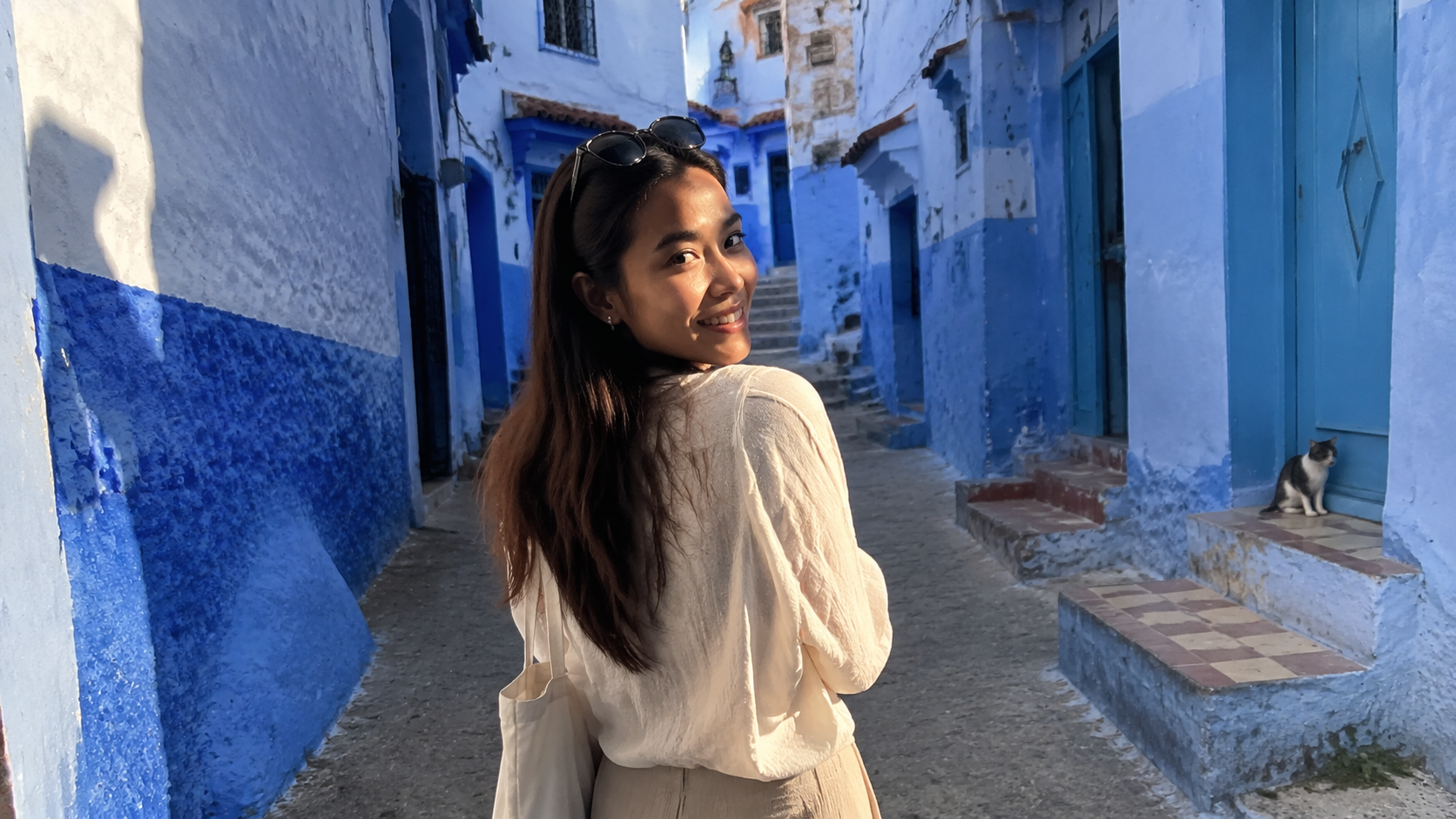
Every phrase from "ultra realistic" onward is describing what real phone photos actually look like — not what the AI image generator thinks a good photo should be. You're reverse-engineering the AI photos aesthetic by telling the AI image generator to leave the flaws in place. This is how you get realistic AI photos that feel authentic.
3. Indoor Realistic AI Photos: Candid Home Moments
The same technique for realistic AI photos works indoors, but the imperfections change. For indoor AI photos, you're dealing with mixed-color-temperature lighting, lens distortion at close range, and visible dust — completely different artifacts from outdoor realistic AI photos.
Copy the AI Art Prompt:
A cozy Sunday morning scene — someone's hand reaching for a ceramic coffee mug on a wooden table next to an open book, soft window light coming from the left, crumbs on the table, the book's pages slightly curled, a phone charging cable visible in the corner of the frame, casual overhead angle — ultra realistic phone snapshot aesthetic, authentic indoor smartphone photography, natural window light only no artificial fill, realistic mixed color temperature from daylight and warm indoor bulb, slight motion blur on the reaching hand, phone camera white balance struggling between cool window light and warm interior, realistic lens distortion on close objects near frame edges, visible dust on the table surface, no stylized flat lay composition, no food-photography polish, no AI-perfect bokeh, feels like a real Sunday morning someone actually photographed.
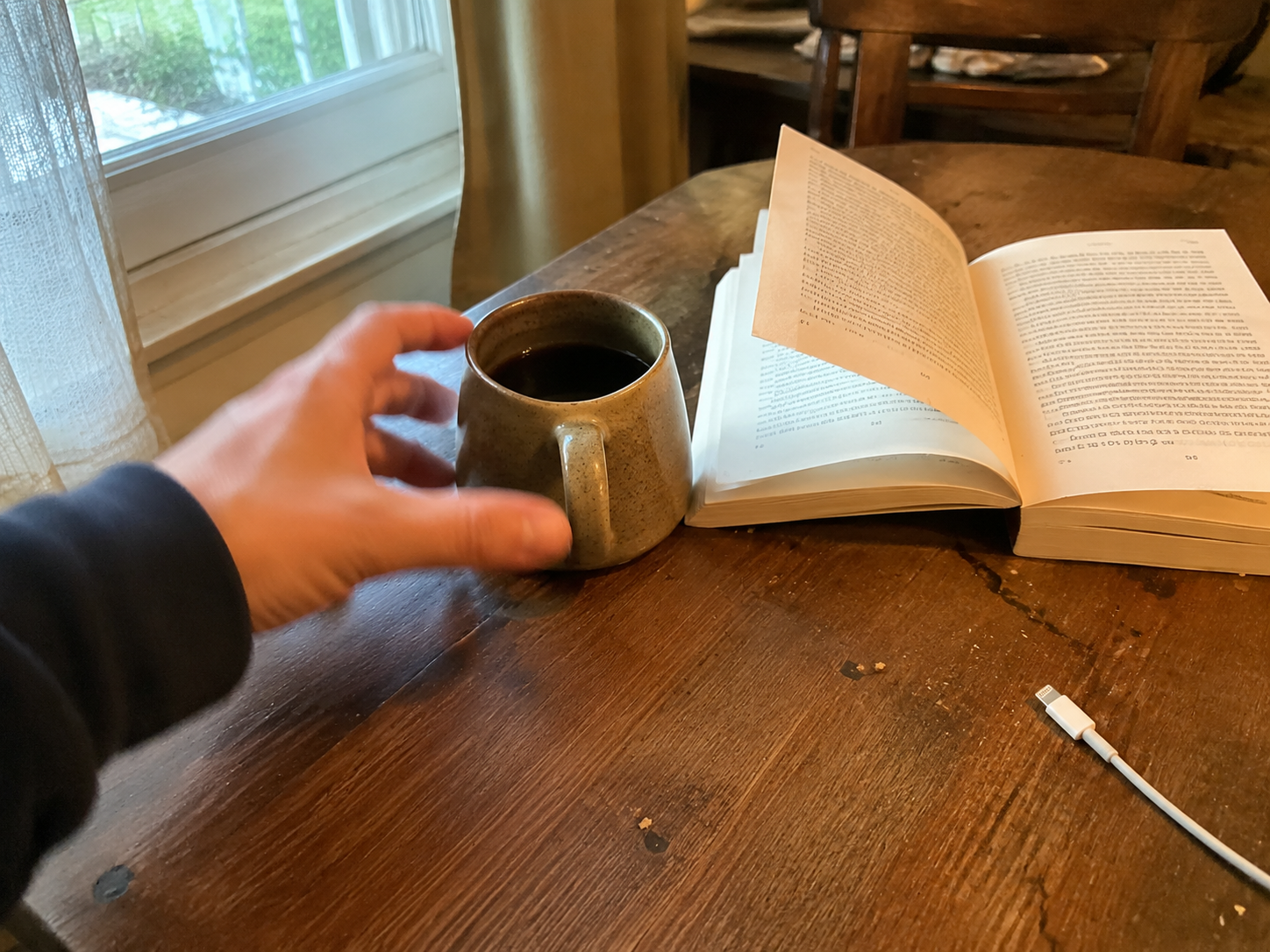
This produces realistic AI photos with a completely different texture. Where the travel prompt created realistic AI photos with clipped skylight and JPEG artifacts, the indoor prompt generates realistic AI photos with mixed color temperatures and lens distortion near object edges. The AI image generator tailors its output to each scene's specific lighting conditions.
4. Night Realistic AI Photos: Low-Light Phone Camera Texture
Night photography creates the most dramatic realistic AI photos because phone sensors struggle hardest in low light. Heavy noise grain, motion blur from slow shutter speeds, and lens flare from bright point sources are the defining characteristics of nighttime realistic AI photos.
Copy the AI Art Prompt:
Night market in Taipei, steaming food stall under warm yellow lights, crowd of people blurred in motion walking past, neon signs in the background slightly overexposed, steam rising from a pot catching the stall lights — ultra realistic night phone photography aesthetic, authentic low-light smartphone sensor behavior, heavy noise grain in the dark areas away from stall lights, realistic motion blur on moving pedestrians from slow shutter speed, overexposed neon signs bleeding into the night sky, lens flare streaks from bright point light sources, phone night-mode processing artifacts with slightly unnatural edge sharpening on static objects, color noise in the deep shadows, realistic dynamic range limitation where stall lights are properly exposed but side alleys fall to near-black, feels like someone walking through a night market and snapping a quick photo on their phone.
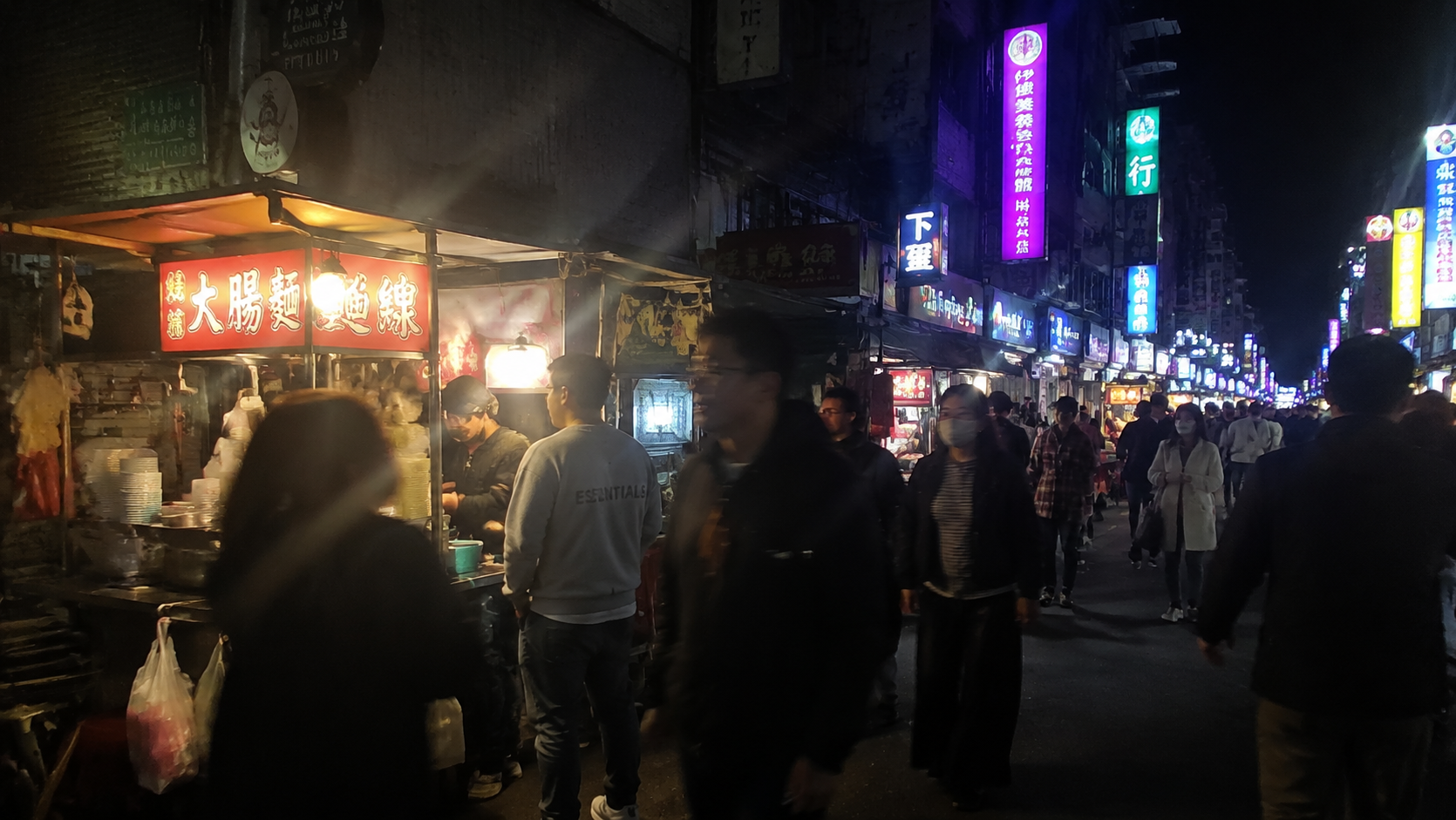
These nighttime realistic AI photos push the AI image generator to its limits — it has to simulate hardware sensor behavior, not just software processing. The result is realistic AI photos that genuinely feel like someone's late-night street photography, shot on whatever phone was in their pocket.
5. From Realistic AI Photos to Video: Seedance 2.0 Phone Footage
Once you have your realistic AI photos from GPT Image 2, you can bring them into Seedance 2.0 using Omni reference and apply the same "describe the flaws" technique — but for motion.
Copy the AI Video Prompt (Seedance 2.0):
Ultra realistic handheld smartphone video aesthetic, filmed vertically in 9:16, natural tourist walking pace through the scene, casual one-handed grip with slight phone tilt, realistic walking bounce transmitted through the arm into the frame, micro jitters from looking around while walking, occasional quick pan to check something off-screen then back, rolling shutter wobble during the pan, smartphone autofocus briefly hunting when passing from shadow to sunlight, digital zoom artifacts on distant details, exposure adjustment lag when looking from bright area to shaded area, compression blockiness in fast-moving foliage, occasional fingertip briefly visible at frame edge, natural wind noise and footsteps in ambient audio, no steadycam smoothness, no cinematic dolly movement, no dramatic music, feels like genuine vacation footage someone would post to their Instagram story.
👉 Start here: Fanch AI Video Generator
The video prompt is a laundry list of real handheld phone behaviors: jitter, wobble, exposure lag, autofocus breathing. When Seedance 2.0 receives this level of direction, it produces realistic AI photos — and now videos — that suppress the default cinematic smoothness and deliver authentic handheld motion instead.
Start Creating Realistic AI Photos Today on Fanch AI
This technique works because GPT Image 2 and Seedance 2.0 on Fanch AI have best-in-class prompt adherence — they listen when you describe imperfections. Weaker AI image generators ignore negative instructions and default back to polished, obviously-AI output.
On Fanch AI, creating realistic AI photos takes three steps:
- Pick a scene — travel, food, lifestyle, nightlife, whatever fits your content
- Describe the flaws — use the aesthetic modifier technique from the prompts above
- Generate and iterate — swap scene details until your realistic AI photos look authentic
No local GPU, no complex setup, no subscription walls. The same AI image generator that produces polished stock-photo-style images also produces realistic AI photos indistinguishable from real phone photography — it just needs the right instructions.
👉 Click here to open the Fanch AI Studio and start generating your own realistic AI photos now!