
Master SeedDance 2.0: The Ultimate Prompting Formula & A Secret Video-to-Video Trick
If you are writing SeedDance AI video prompts like standard image instructions, you are setting yourself up for failure.
A static image is a single captured moment; a video is a living, breathing timeline. When users want to generate cinematic shots, their biggest bottleneck isn't the model's capability—it's how they structure their SeedDance AI video prompts.
Today, we are sharing our internal playbook. We will break down the exact workflow for structuring your scenes, moving from static to dynamic, and reveal a highly requested method for bypassing strict filters in Video-to-Video workflows smoothly.

🖼️ The Baseline: The Image Prompt Formula
Before we animate, let's establish the baseline. If you are generating a static image (or a first frame for your video), it requires less structural complexity than SeedDance AI video prompts. Your text should follow this rigid hierarchy to prevent the AI from getting confused:
- The Overview (The Vibe): Image Quality + Art Style + Lens/Camera Effects + Lighting + Main Subject.
- The Subject (The Focus): Character/Object details + Action + Clothing + Accessories + Props.
- The Details (The World): Scene layout + Background Environment.
Example: (Cinematic, 8k, 35mm lens, moody neon lighting, cyberpunk hacker) + (typing furiously, wearing a glowing LED jacket, VR goggles) + (rainy alleyway, trash cans, neon signs).
🎬 The Evolution: The Formula for SeedDance AI Video Prompts
Video introduces the dimension of Time. Superior SeedDance AI video prompts must instruct the model not just on what is there, but how it moves and evolves.
Here is the ultimate 4-part structure for crafting perfect SeedDance AI video prompts:
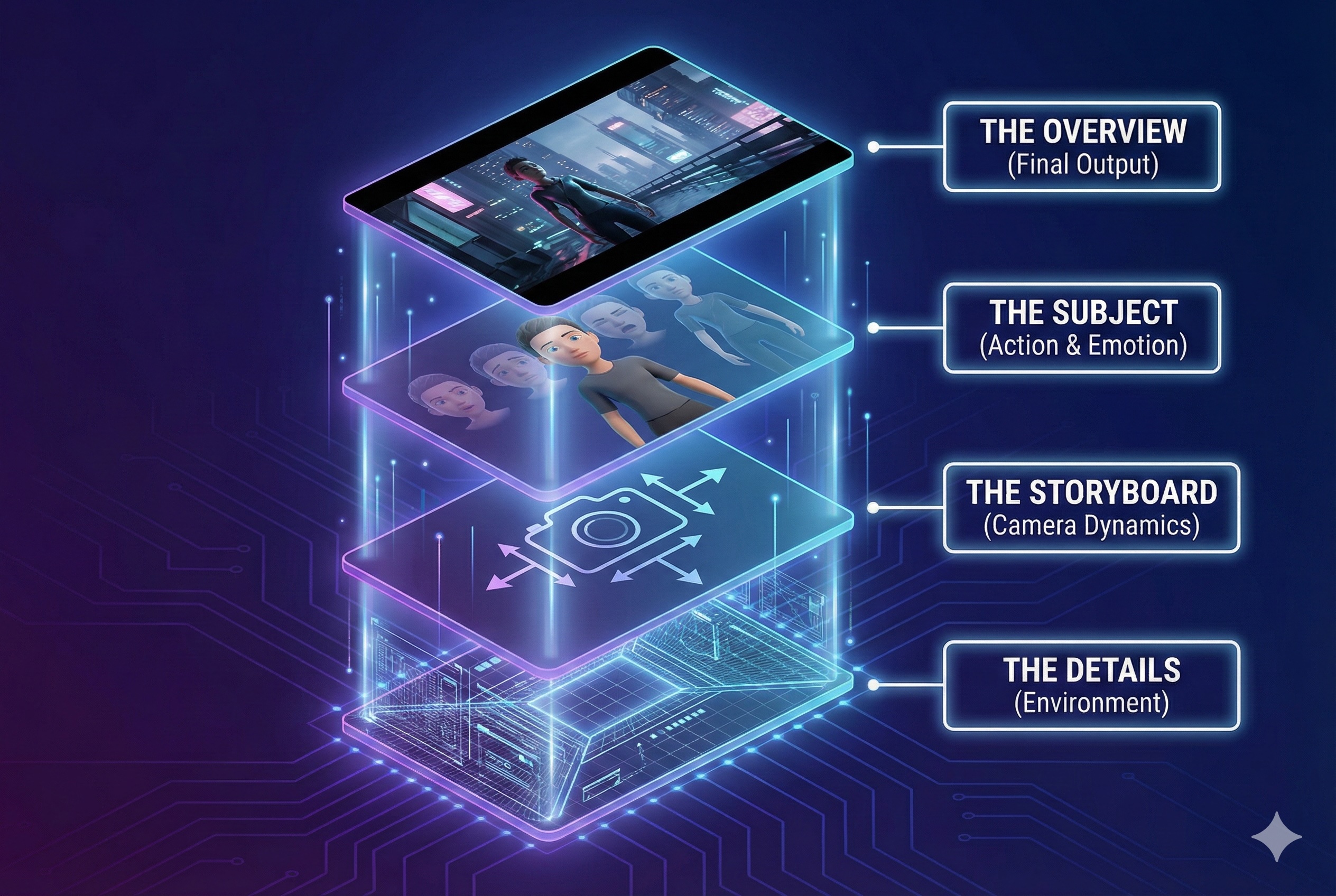
1. The Overview (Setting the Stage)
- Structure: Video Quality + Cinematic Style + Lighting + Core Subject.
- Why it matters: You must establish the "film stock" and the lighting rig before the actors even step on set.
2. The Subject (Evolving Emotion & Action)
- Structure: Character Identity + Portrait details + Clothing + Evolving Expressions + Dialogue/Monologue cues.
- CGO Tip: Unlike static images, a video subject breathes. Highly effective SeedDance AI video prompts always describe emotional shifts. Don't just say "sad." Say: "Her expression shifts from subtle anxiety to a relieved smile." ### 3. The Storyboard (Camera Dynamics)
- Structure: Specify the exact Camera Movement and Framing.
- CGO Tip: Because a video is dynamic, your SeedDance AI video prompts must explicitly direct the lens. Are we starting with a Wide Establishing Shot (WS), or an Extreme Close-Up (ECU)? Describe the camera behavior per shot.
4. The Details (The Living Environment)
- Structure: Scene Layout + Dynamic Environmental Elements.
- CGO Tip: Make the background alive within your SeedDance AI video prompts. Mention "leaves blowing in the wind" or "flickering streetlamps."
⚖️ The Control Spectrum: Precision vs. AI Hallucination
Remember: You are the director. The more precise and structured your text is based on the formula above, the less "creative freedom" the AI has, giving you exactly what you want.
🚨 Fanch AI Exclusive: The Video-to-Video Moderation Bypass Trick
SeedDance 2.0 has an incredibly powerful "Video Reference" (Video-to-Video) feature. However, many creators hit a brick wall: Strict Content Moderation. Sometimes, completely safe reference videos are falsely flagged.
Here is a clever workaround to bypass it effortlessly: The moderation AI primarily scans for clear human faces to detect policy violations. If your reference video is getting rejected:
- Drop your reference video into any basic editing app.
- Apply a light pixelation (mosaic) over the subject's face, or place a black censor bar over their eyes.
- Re-export and upload to SeedDance.
Boom. It will instantly pass the moderation check! Because the AI relies on overall body pose for the Video-to-Video generation, blurring the face in the reference video will not affect the quality of your final AI output.
🚀 Stay Tuned for Fanch AI Integration
To be completely transparent: the official SeedDance 2.0 API is not yet live, which means third-party platforms cannot offer direct generation just yet.
However, the engineering team at Fanch AI is fully prepped. The moment the API drops, we will be the first platform to offer a seamless workflow. Until then, you can practice writing these SeedDance AI video prompts on the official app and get ready for our launch.
👉 Learn more about SeedDance 2.0 capabilities and join the Fanch AI waitlist!