
MiniMax H3 AI Video Generator Online - Hailuo 03 Multimodal 2K
Hosted MiniMax H3 (Hailuo 03) on Fanch AI. Build multimodal clips with native stereo sound, Text to Video, first and last frames, and reference images, clips, or audio at up to 2K.
MiniMax H3 Gallery: Commercial Hailuo 03 Use Cases
MiniMax H3 is positioned for commercial multimodal creation—advertising, branding, e-commerce, product design, UI/UX, and gaming—not only decorative loops. These MiniMax H3 / Hailuo 03 scenarios mirror official demos and production briefs teams actually ship.
Key Features of MiniMax H3 (Hailuo 03) on Fanch
Capabilities below follow MiniMax’s MiniMax H3 / Hailuo 03 research notes, Hugging Face specs, platform guides, and the Text / Image / Reference modes available for MiniMax H3 on Fanch.
MiniMax describes MiniMax H3 as a general-purpose multimodal system: one Hailuo 03 context can blend text, images, clips, and audio. A classic MiniMax H3 example is “Reference Hitchcock movement from clip 1, have the character in image 2 sing, vocals matching audio 3.” MiniMax H3 resolves those roles in natural language instead of forcing separate expert tools.
MiniMax H3 Text, Frames, and References
Create with MiniMax H3 Workflows on Fanch Today
Switch MiniMax H3 modes for prompt-only Hailuo 03 scenes, first/last-frame animation, or multimodal reference control with images, clips, and audio.
Text Mode With MiniMax H3
Write an audiovisual MiniMax H3 prompt covering subject, setting, camera, dialogue, music, and ambience. Hailuo 03 Text to Video builds a complete stereo clip without uploads—strong for ads, titles, and concept tests.
Frames and Reference Modes With MiniMax H3
Upload a MiniMax H3 first frame or first and last frames, or combine reference images, clips, and audio. Hailuo 03 keeps identity, motion, and voice roles aligned while you edit or transfer performance with clear natural-language instructions.
MiniMax H3 Prompt Examples for Hailuo 03 Workflows
These MiniMax H3 prompts follow official Hailuo 03 strengths—multimodal roles, audiovisual direction, first/last frames, and identity preservation. Adapt brands, languages, and products to your brief.
MiniMax H3 Text Mode: Biker Bunny Through the City
MiniMax H3 Text to Video prompt: A photoreal cinematic tracking shot of a large fluffy white rabbit wearing tiny round black sunglasses, riding a black chrome chopper motorcycle with ape-hanger handlebars down a sunny San Francisco-style hill street. Ears blown back by wind, paws gripping the bars, rear feet on the pegs. Victorian bay-window houses, motion-blurred traffic, distant bay and hills under a clear sky. Keep fur and chrome highly detailed. End on a wide shot of the same chopper parked on a red-curbed sidewalk in front of a monumental black glass pyramid under bright midday light. Native stereo engine roar and city ambience, about 15 seconds.
MiniMax H3 First Frame: Cheese Cyclist in the Workshop
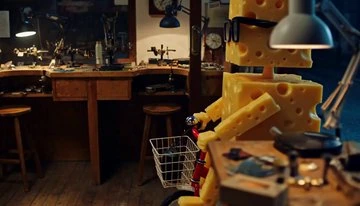
MiniMax H3 Image to Video prompt with first frame: Animate the uploaded first-frame still. Preserve the blocky Swiss-cheese humanoid with hole textures and thick black-rimmed glasses, the miniature red bicycle with white wire basket, the cluttered wooden workbench, tools, and warm desk-lamp lighting. The cheese character climbs onto the tiny red bike and pedals left through the workshop with shallow depth of field and cozy stop-motion macro energy. Keep identity, glasses, cheese materials, and workshop layout consistent. About 15 seconds, native stereo soft workshop ambience.
MiniMax H3 First & Last Frames: Yarn Ball to Soft Device

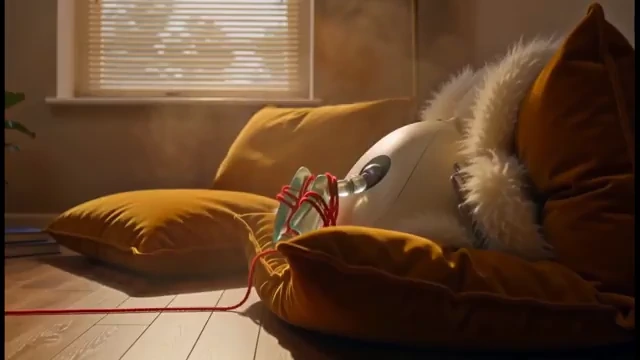
MiniMax H3 Image to Video prompt with first and last frames: Start from the first-frame still—a large bright red yarn ball rolling across a polished wooden living-room floor, thin red thread trailing behind, mid-century sideboard with orange mushroom lamp, houseplant, and warm sunlight through blinds; a yellow duck head and a retro TV with glowing blue eyes peek in from the left. Transition through a Pixar-style beat where a cream robotic duck toy with a chest screen of angry white eyes pulls the red yarn. End exactly on the last-frame still—a sleek white rounded device with white fur trim and a translucent green glass piece, bound by red cords, nestled in mustard-yellow velvet cushions on wood flooring under hazy golden window light. Preserve both endpoint compositions and materials. About 10 seconds, native stereo.
MiniMax H3 Reference: Emerald and Gold Swans
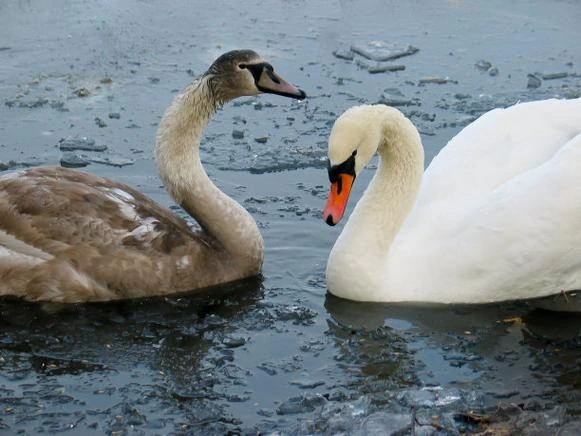
MiniMax H3 Reference to Video prompt: Use the uploaded reference image as identity and composition lock. A stylized 3D / paper-cut scene of two swans facing each other across a wavy multi-layered divider. Left: emerald-green swan in shimmering metallic gold water with concentric ripples and clear reflection. Right: golden-yellow swan in deep emerald water with matching ripples. Thin terraced gold-and-green bands form a yin-yang style S-curve divider. Animate gentle swimming, expanding ripples, soft light shifts, and a very slow camera drift while preserving colors, symmetry, beak red accents, and the divider geometry. About 5 seconds, native stereo soft water ambience.
MiniMax H3 FAQ: Hailuo 03 Answers for Creators
Answers grounded in MiniMax H3 / Hailuo 03 documentation and how MiniMax H3 runs on Fanch.
Yes. MiniMax H3 is also known as Hailuo 03—an open, general-purpose multimodal generation system from MiniMax. MiniMax H3 understands text, images, clips, and audio in one context and outputs picture plus native stereo sound.
MiniMax H3 on Fanch supports Text to Video, Image to Video (first frame and/or last frame), and Reference to Video with reference images, clips, and audio—matching the official Hailuo 03 task split documented by MiniMax.
Official MiniMax H3 guidance uses integer durations from 4 to 15 seconds. On Fanch you can choose 768P or 2K for MiniMax H3. Hugging Face materials also describe 24 FPS output and In-Context Regeneration paths for high-resolution Hailuo 03 detail.
Yes. MiniMax H3 ships native stereo sound with the picture (public specs cite 32 kHz stereo). Dialogue, ambience, music, and effects can be directed in the same MiniMax H3 / Hailuo 03 prompt instead of a separate silent render.
For MiniMax H3 Reference to Video, platform guides allow up to nine images, three clips, and three audios, with a mixed cap around twelve files. Reference audio cannot be used alone—pair it with a MiniMax H3 image or clip reference. Per-clip and total reference durations are typically bounded to the 2–15 second range.
MiniMax positions MiniMax H3 for precise, controllable multimodal editing: subject replacement, motion transfer, background changes, relighting, wardrobe or product swaps, and dialogue or voice updates while preserving unaffected Hailuo 03 timing and composition.
Hugging Face MiniMax H3 notes stable dialogue support across eleven languages—including Arabic, Chinese, English, French, German, Italian, Japanese, Korean, Portuguese, Russian, and Spanish—with additional languages supported to varying degrees.
Sign in, open the generator, choose MiniMax H3, pick Text / first-frame / first-last-frame / multimodal reference mode, set duration and 768P or 2K, write a clear MiniMax H3 prompt that assigns roles to any Hailuo 03 references, then generate.
Start Creating with MiniMax H3 (Hailuo 03) Online Now
Open MiniMax H3 on Fanch and turn prompts or multimodal references into stereo 2K Hailuo 03 clips with Text, frame, and reference modes.